Docker Basic commands and How to Create Container from Docker Hub Image .

How to Create image from container
How to Create Container from Docker Hub Image
Docker Defenition
Docker is an open source software platform to create, deploy and manage virtualized application containers on a common operating system (OS), with an ecosystem of allied tools. Docker container technology debuted in 2013; Docker Inc. was formed to support a commercial edition of container management software and be the principal sponsor of an open source version. Mirantis acquired the Docker Enterprise business in November 2019.
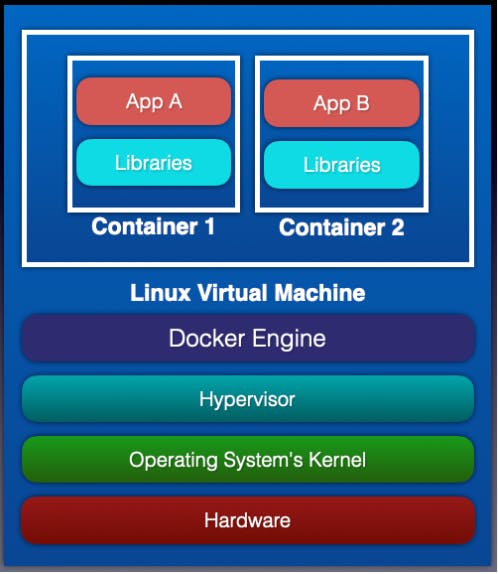
containerization is an approach to software development in which an application or service, its dependencies, and its configuration (abstracted as deployment manifest files) are packaged together as a container image.
tep to Create Container from Image and
Create Image from Update Container
Update System
sudo apt-get update

sudo apt-get install docker -y
After Installing DOCKER add it to the user group of Operating System and then reboot the system.
sudo usermod -aG docker $USER
sudo reboot

Docker Images Search
docker search <image_name>

eg:  docker search mysql
Pull Images from DockerHub
docker pull <image_name>
eg: docker pull mysql

To See all Images
docker images

Create Container From Image:
docker run -it --name <container_name> <image_name> /bin/bash

To Check all Container
docker ps -a
To Check Only Running Container

To Delete Container
docker rm <container_id>
docker rm <container_name>
To Stop Running Container
docker stop <container_name>
docker stop <container_Id>
To Go Inside Container:
COPY
docker attach <container_name>
docker attach <container_id>

To Check the container stats:

To be continued in the next blog ,Till then stay tuned bye!!


